Consent forms are used for school trips, sports and summer camps, photography and video, workshops, surveys and student research projects, volunteering, and many community activities. The goal is always the same: explain clearly what will happen, and record that the person — or their parent or guardian — understood and agreed.
What the template contains
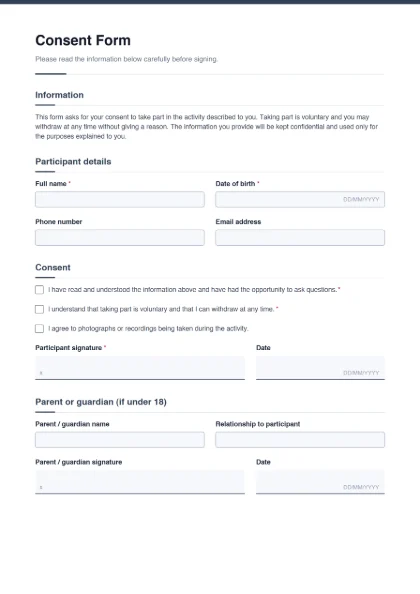
- Information: a paragraph explaining that taking part is voluntary, that the person may withdraw at any time, and that information will be kept confidential — replace it with the specifics of your activity.
- Participant details: full name*, date of birth*, phone number and email address.
- Consent: three separate tick boxes — “I have read and understood the information…”*, “I understand that taking part is voluntary…”*, and an optional “I agree to photographs or recordings being taken”.
- Participant signature* (with a date).
- Parent or guardian (if under 18): name, relationship to the participant and signature.
Writing good consent wording
- Be specific. Say what the activity is, where and when it happens, what the person will be asked to do, and any risks.
- One statement per tick box. Separate “I agree to take part” from “I agree to photos being used on social media”, so people can say yes to one and no to the other.
- Explain how data is used. Who will see the information, how long you keep it, and who to contact with questions.
- Use plain language. If participants are more comfortable in Urdu or another language, add a translated paragraph or make a second version of the form.
Important: this is a general template, not legal or medical advice. For medical procedures, clinical research, or anything with legal consequences, have the wording reviewed by a qualified professional or your institution’s ethics committee, and use any form they require.
Common variations
| Use | What to change |
|---|
| School trip permission | Add destination, date, transport, cost and an emergency phone; keep the parent signature. |
| Photo / video release | Add where images will appear (website, social media, prospectus) as separate tick boxes. |
| Student research or survey | Describe the study, how answers stay anonymous and how to withdraw; add the supervisor’s contact. |
| Sports or fitness activity | Add medical conditions, allergies and an emergency contact field. |
Collecting signatures
Participants can sign the completed PDF with Sign PDF. If you need a parent to sign remotely and want proof of when they signed, send the form as an e-signature request — the signer gets a link and the final PDF includes an audit trail. For schools, pair this form with the school admission form; for events, the registration form collects attendee details. Browse all form templates.