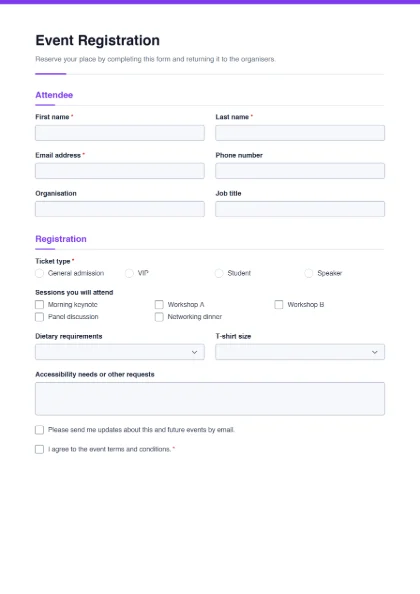
Seminars, training workshops, conferences, sports days, alumni dinners, Quran or coding classes, exhibitions and community events all need the same basics: who is coming, how to reach them, which option they chose, and anything you must prepare for. This template covers those and is easy to adapt into a course or membership registration form.
Fields in the template
- Attendee: first name*, last name*, email*, phone, organisation and job title.
- Registration: ticket type* (general admission, VIP, student, speaker), the sessions the person will attend (morning keynote, workshop A, workshop B, panel discussion, networking dinner), dietary requirements (none, vegetarian, vegan, halal, kosher, gluten-free, other), T-shirt size, and accessibility needs or other requests.
- Consent: an optional tick box for event updates by email, and agreement to the event terms and conditions*.
- Rename “Ticket type” to “Course” or “Batch” and list your options, e.g. “Morning batch”, “Evening batch”, “Weekend batch”.
- Replace the sessions with modules, or delete them for a single-session event.
- Add a fee and payment section: amount, payment method (cash, bank transfer, mobile wallet) and a transaction reference field.
- For students, add CNIC / B-Form number, institute and year of study.
- Delete the T-shirt size if you are not giving out shirts.
Tip: put the event date, venue and contact number in the form’s intro text, so the PDF answers the most common questions on its own.
Planning with the answers
Read through the returned forms a few days before the event and count what you need to prepare:
- Seats and rooms: the sessions question tells you how many people to expect in each workshop or hall.
- Food: the dietary question gives you numbers for vegetarian, halal or other meals so the caterer can plan properly.
- Badges and certificates: names and organisations are already typed, so you can copy them straight into badge or certificate lists without guessing handwriting.
- Accessibility: check the requests box early so you have time to arrange ramps, seating or a helper.
Fillable, printed — or both
Share the fillable PDF before the event so attendees can register from a phone and send the file back. On the day, print blank copies for walk-in registration. Because answers live inside each PDF rather than an online database, this suits small and medium events; for very large events with online payments, a dedicated ticketing service may suit you better.
If participants must agree to photography or physical activity, add the consent form. Collect post-event opinions with the feedback form. All templates are in the form template gallery.