Ask customers what they think
Restaurants, retail shops, salons, clinics, hotels, training institutes and service businesses use short feedback forms to find out what is working and what is not. A printed card at the counter reaches walk-in customers; a fillable PDF works for customers you serve by email or WhatsApp. This template keeps the questions few and easy, which is the main reason people finish a survey.
Questions in the template
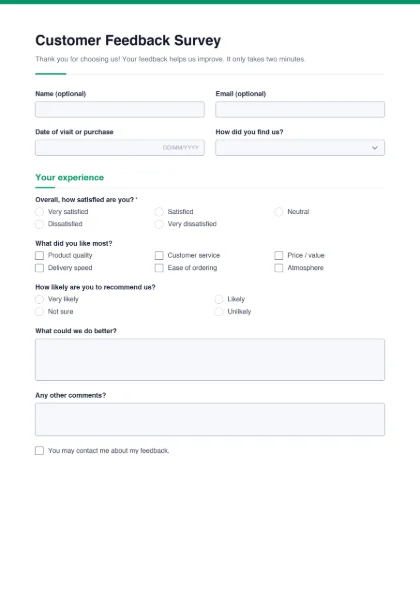
- About the customer (optional): name, email, date of visit or purchase, and how they found you (search engine, social media, friend or family, advertisement, walked past, other).
- Your experience: overall satisfaction* on a five-point scale from “Very satisfied” to “Very dissatisfied”; what they liked most (product quality, customer service, price / value, delivery speed, ease of ordering, atmosphere); how likely they are to recommend you; what you could do better; and any other comments.
- Follow-up: a tick box allowing you to contact them about their feedback.
Tips for useful feedback
- Keep it short. One page is ideal. Remove questions you will not act on.
- Make names optional. Customers are more honest when they can stay anonymous — the template already marks name and email as optional.
- Ask about a specific visit. The date field helps you link comments to a shift, branch or delivery.
- Add one open question. “What could we do better?” often gives the most useful answers.
- Close the loop. If someone ticks the contact box and had a problem, call them back.
Customize for your sector: a restaurant might add “Food taste” and “Cleanliness”; a training institute “Trainer” and “Course material”; a clinic “Waiting time” and “Staff courtesy”.
Turning answers into action
Collect the returned forms in one folder each week. Count the satisfaction answers in a simple spreadsheet — one row per form, one column per question — so you can see whether things improve month by month. Group the written comments into a few themes (for example waiting time, staff behaviour, price) and pick one theme to fix first. When you change something because of feedback, tell customers: a small sign saying “You asked, we listened” encourages more people to fill in the form next time.
Printed cards or fillable PDF
For a counter or table, print the blank form on A4 or ask a print shop to print it smaller; customers tick the boxes with a pen. For online customers, email the fillable PDF after delivery — they can fill it on a phone and send it back. Because this is a PDF, answers are not collected automatically; if you expect hundreds of responses, an online survey tool will save time.
Hosting an event? Use the registration form before it and this form after it. Selling products? The order form captures orders. See all form templates.