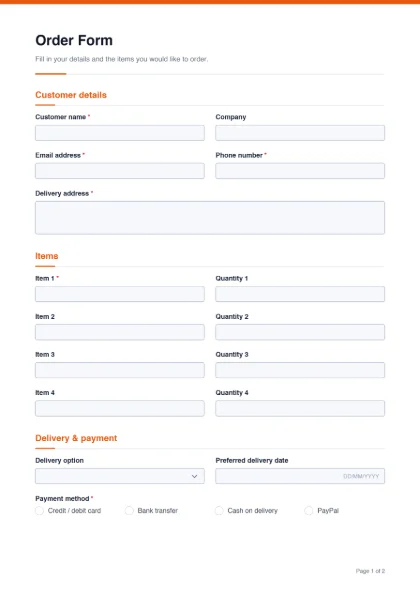
Home bakers, clothing and crafts sellers, printing shops, school uniform suppliers, wholesalers and caterers often take orders through chat messages that are easy to misread. An order form puts the customer’s name, address, items, quantities, delivery choice and payment method in one place, so fewer orders go wrong.
Fields included
- Customer details: customer name*, company, email*, phone* and delivery address*.
- Items: four item lines, each with an item name and a quantity (item 1 is required).
- Delivery & payment: delivery option (standard 3–5 days, express 1–2 days, collect in store), preferred delivery date, payment method* (credit / debit card, bank transfer, cash on delivery, PayPal), special instructions, and the customer’s signature.
Make it fit your business
- Products as a list: change “Item 1” into a dropdown of your products so customers pick instead of typing.
- More lines: duplicate an item and quantity pair as many times as you need.
- Sizes and colours: add a dropdown for size (S, M, L, XL) or a text field for colour next to each item.
- Local payment options: edit the payment methods — for example cash on delivery, bank transfer, or a mobile wallet — and remove ones you do not accept.
- Prices: add a paragraph with your price list or a link to it, and a number field for the total.
Note: PDF form fields do not calculate totals in this builder. Add a “Total amount” number field for the customer or your staff to fill in, and confirm the final amount when you accept the order.
Avoiding common order mistakes
- Confirm before you start work. Reply to every order with a short confirmation of items, total and delivery date, especially for custom or made-to-order items.
- Ask for a landmark. Add a “Nearest landmark” line under the delivery address if your riders often struggle to find houses.
- Record advance payments. For custom orders, add a field for the advance amount and the transaction reference.
- Keep the item names exact. A product dropdown avoids confusion between similar items and sizes.
An order form records what the customer asked for; it is not an invoice or a tax document. After you accept the order, send your normal invoice or receipt. Keep the signed order forms together — you can join a month’s orders into one file with Merge PDF. If a customer signs digitally, they can use Sign PDF.
After delivery, ask for opinions with the customer feedback form. For enquiries before a sale, the contact and enquiry form is in the form templates gallery, along with the registration form for events and classes.