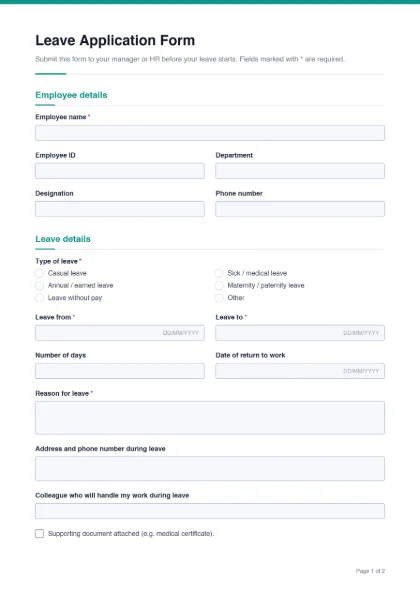
Many offices, schools, hospitals and factories still handle leave on paper or by a plain written application. A standard form is quicker for staff and much easier for managers and HR: every request has the same information, the dates are clear, and the approval is recorded on the same page. This template works for private companies, NGOs, schools and colleges in Pakistan and across South Asia, and it is general enough to use anywhere.
- Employee details: employee name*, employee ID, department, designation and phone number.
- Leave details: type of leave* — casual, sick / medical, annual / earned, maternity / paternity, leave without pay, or other; leave from* and leave to* dates; number of days; date of return to work; reason for leave*; address and phone number during leave; the colleague who will handle the work; and a tick box for a supporting document such as a medical certificate.
- Employee signature*.
- For office use: leave balance before and after, the decision (approved, approved with changes, not approved), remarks, and signature lines for the approving manager and the HR department.
Leave rules differ between employers and sectors, so check your own HR policy or appointment letter rather than relying on a template. Many organisations distinguish casual leave (short, often unplanned absences), sick or medical leave (often needing a doctor’s certificate after a set number of days) and annual or earned leave (planned holidays that build up over the year). Government departments and some large employers have their own leave forms and rules — if yours does, use theirs.
In the builder you can:
- rename or remove leave types, or add one such as “Hajj / Umrah leave” or “study leave”;
- change “Employee ID” to “Roll number” or “Staff number”;
- add a line like “Submit at least three working days before planned leave” to the intro text;
- remove the HR signature line if your manager approves leave alone.
Leave application for schools and students
Teachers can use the form as it is. For a student leave application, customize it: change “Employee details” to “Student details”, replace employee ID and department with class and section, and change the approval lines to “Class teacher” and “Principal”. Parents can then fill it on their phone and send it to the school on WhatsApp.
Signing and filing
The employee can sign the filled PDF with Sign PDF; the manager can open the same file and sign the approval line. If you keep records digitally, attach the medical certificate to the form with Merge PDF so everything is in one file. For new staff, the employee information form collects joining details, and when someone leaves, the experience certificate template helps HR issue a letter quickly.
See every free form template.