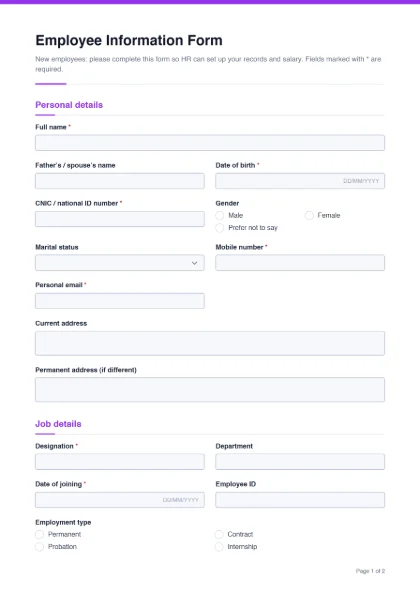
When someone joins, HR needs the same set of details every time: who they are, how to contact them and their family in an emergency, where to pay their salary, and the basic facts of their job. Collecting this on a standard joining form — instead of scattered messages — keeps employee files complete and makes payroll set-up quicker. The template suits small and medium businesses, schools, clinics and NGOs.
- Personal details: full name*, father’s / spouse’s name, date of birth*, CNIC / national ID number*, gender, marital status, mobile number*, personal email*, current address and permanent address.
- Job details: designation*, department, date of joining*, employee ID, employment type (permanent, contract, probation, internship) and reporting manager.
- Salary account: bank name, account title, and account number / IBAN.
- Education: highest qualification (dropdown) and institute.
- Emergency contact: contact name, relationship and phone*.
- Declaration: confirmation that the details are correct and that the employee will report changes, the employee’s signature*, and a “Received by (HR)” signature line.
Handle personal data carefully
This form holds sensitive information — ID numbers and bank details. Good practice:
- Ask only for what you need; delete fields such as marital status if your organisation does not use them.
- Store completed forms in a restricted folder or a locked cabinet, and limit who can open them.
- If you email the filled form, consider adding a password with Protect PDF.
- Ask employees to update their details when they change (new address, new bank account).
Tip: send the form to new joiners a few days before they start, together with a checklist of documents to bring (CNIC copy, degree copies, photographs, previous experience certificates).
Customize it for your company
- Add your logo and brand colour, and change the title to “Joining Form — Your Company”.
- Add fields for EOBI or social security number, blood group, or a nominee for benefits, if your HR process uses them.
- Change “CNIC / national ID number” to “Passport number” for international staff.
- Add an “IT equipment issued” section if HR also records laptops and ID cards.
Once the employee is on board, the leave application form handles time-off requests. Before hiring, the job application form collects candidate details. All HR forms are on the form templates page.