Issue an experience letter in minutes
An experience certificate (also called an experience letter or service certificate) confirms that someone worked for your organisation, in what role and for how long. Former employees need one for new jobs, higher studies, immigration and visa files, and government job applications. Small businesses without an HR department often struggle to write one; this template gives you a clear, professional format to fill in.
What the template includes
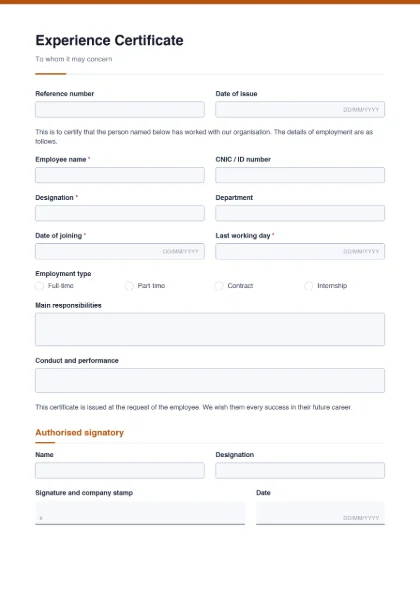
- Reference number and date of issue.
- The heading “To whom it may concern” and an opening statement certifying that the person worked with your organisation.
- Employment details: employee name*, CNIC / ID number, designation*, department, date of joining*, last working day*, and employment type (full-time, part-time, contract, internship).
- Main responsibilities and conduct and performance (larger text boxes).
- A closing line that the certificate is issued at the employee’s request, with good wishes.
- Authorised signatory: name, designation and a “signature and company stamp” line (your logo and company name go in the header).
What HR usually puts in an experience certificate
- Letterhead or logo with the company’s address and contact details.
- Exact dates of joining and leaving, and the last designation held (mention promotions in the responsibilities box if useful).
- A short, factual description of duties — three to five lines is enough.
- A fair remark on conduct, such as “hard-working, honest and reliable”. Keep it truthful.
- Signature, name and designation of an authorised person (HR manager, director or owner) and the company stamp.
Government jobs: FPSC, PPSC and other public bodies sometimes publish their own specimen experience certificate format with required wording. This template is a generic version — if the job advertisement or the commission provides a specimen, use that exact format.
Customize the wording
In the builder you can rewrite both paragraphs, for example “This is to certify that Mr. / Ms. … has worked with us as …”. You can also remove the CNIC field if you prefer not to print ID numbers, add a “Salary at the time of leaving” field if the employee asks for it, or add a second signatory. Upload your logo and pick your brand colour so the certificate matches your other documents.
To sign digitally, the authorised person can add a drawn or uploaded signature (and a stamp image) with Sign PDF. If the employee needs to attach the certificate to an online application with a size limit, Compress PDF reduces the file size.
The full employee life cycle is covered by the job application form, the employee information form for joining, and the leave application form. Former employees preparing their next application can build a CV with the free CV builder. See all form templates.