A standard application form makes hiring fairer and faster: every candidate answers the same questions in the same order, so you can compare people side by side instead of hunting through CVs of every shape. Small businesses, schools, clinics, NGOs, restaurants and factories in Pakistan and elsewhere often use one for walk-in candidates and for roles where many people do not have a polished CV.
Fields included in the template
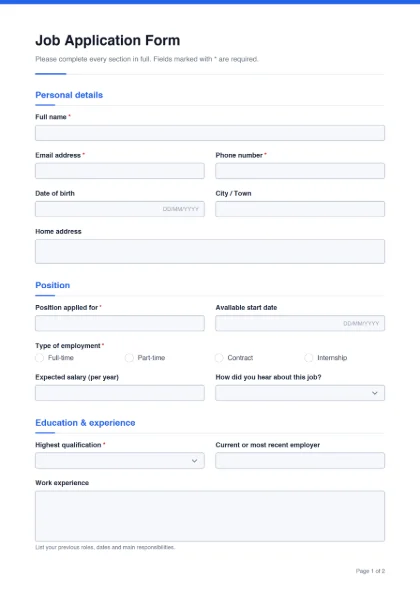
The form is split into five sections. Fields marked * are set as required in the builder (the PDF itself does not block saving, but they are clearly marked).
- Personal details: full name*, email*, phone*, date of birth, city / town, home address.
- Position: position applied for*, available start date, type of employment* (full-time, part-time, contract, internship), expected salary, and how the candidate heard about the job.
- Education & experience: highest qualification* (dropdown), current or most recent employer, work experience (large box), languages spoken, and “Why do you want this job?”.
- References: reference name and phone or email.
- Declaration: a tick box confirming the information is true, and the applicant’s signature*.
How to adapt it for your vacancy
Open the template with Customize this form. Common changes:
- Add your branding: upload a logo, set your brand colour and change the title to “Application for Employment — Your Company”.
- Make the position fixed: replace “Position applied for” with a dropdown of your open roles.
- Remove what you do not need: many employers no longer ask for date of birth at the application stage — delete the field if age is not relevant to the job.
- Add role questions: driving licence (yes/no), shift preference, notice period, or a portfolio link.
- Languages: the checkbox group lists English, Spanish, French, German and Arabic; edit the options to Urdu, Punjabi, Sindhi, Pashto or whatever matters for the job.
Tip: keep the form to two pages. Long forms put off good candidates, and you can ask for detail at interview.
Fillable or printed
Put the fillable PDF on your website or send it by email so applicants can type their answers, save the file and send it back. For walk-in hiring days, print a stack of blank copies — the fields print as neat boxes. If applicants send you a scanned paper form and a CV, you can combine them into one file with Merge PDF.
Signatures and the declaration
The declaration asks the candidate to confirm the information is true. They can sign the completed PDF with Sign PDF by drawing or typing their signature. When you make an offer, you can send the offer letter for an e-signature with an audit trail. Once someone is hired, the employee information form collects their joining details, and the leave application form covers time off later.
Looking for other HR forms? See all fillable form templates.